(05) WordPress

Optimize on upload. No re-uploads.

The UltraPixx plugin hooks into your Media Library: SEO filenames, alt text, and optional TinyPNG compression โ€” powered by your UltraPixx account. v1.4.0

WordPress admin ยท UltraPixx settings
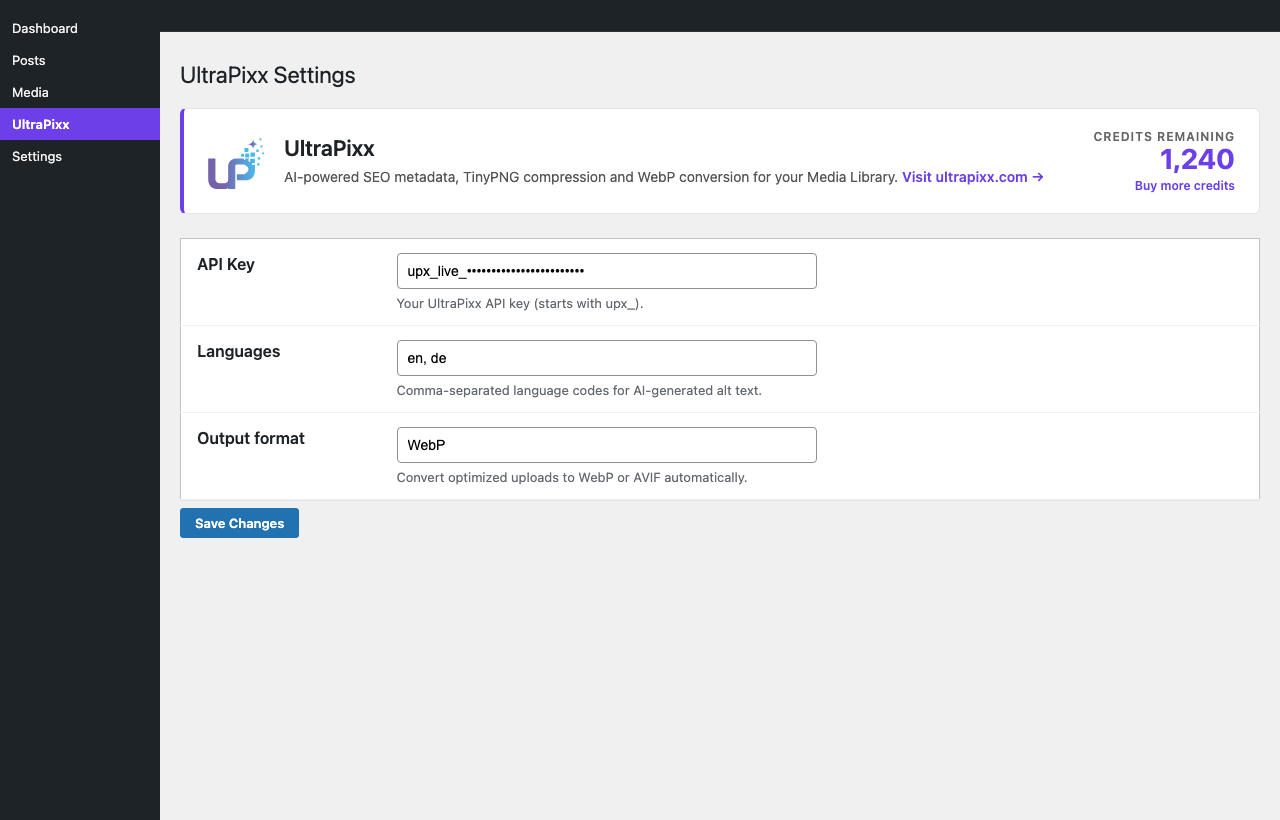
UltraPixx WordPress plugin settings with API key, languages, and live credit balance

What it does

  • check Renames uploads to AI-generated SEO filenames (optional)
  • check Writes descriptive alt text back to the attachment
  • check Optional TinyPNG compression in place (same format)
  • check Bulk-process existing Media Library images
  • check Built-in auto-updater from ultrapixx.com
  • check Uploads never block if the API is down

WebP/AVIF conversion lives in the UltraPixx dashboard and REST API. The plugin focuses on Media Library SEO + compression.

Installation

Four steps. You need an UltraPixx account and API key.
1
Create an UltraPixx account
Sign up, grab your welcome credits, then create an API key under Settings โ†’ API Keys.
2
Download the plugin zip
Use the button above (or download from your dashboard after login).
3
Install in WordPress
Plugins โ†’ Add New โ†’ Upload Plugin โ†’ Install Now โ†’ Activate.
4
Paste your API key
In WP admin go to UltraPixx โ†’ Settings. Paste the key, pick languages, enable auto-process / compression as needed.

Requirements

WordPress
6.0 or newer
PHP
8.1 or newer
UltraPixx
API key + credits

FAQ

Does every upload cost credits?

Yes when processing runs. SEO analysis and compression each have their own credit cost โ€” same pricing as the dashboard and API.

What if UltraPixx is unreachable?

The upload still succeeds. The original file is kept; nothing is renamed or compressed until the API responds successfully.

Which languages are supported?

Currently English and German for AI metadata. More languages as we add them on the server.

Can I process my existing library?

Yes โ€” Media โ†’ UltraPixx (or the bulk tools in the plugin) can walk existing attachments.

Where do WebP / AVIF fit in?

Use the UltraPixx dashboard or REST API for format conversion. The plugin writes SEO + optional TinyPNG compression into the Media Library file.

Recent releases

Latest first.
v1.4.0 Latest
Uploads are now processed asynchronously via WP-Cron โ€” the admin upload flow returns instantly instead of blocking up to 60s for the API round-trip. API failures now surface as dismissible admin notices. Settings page redesigned with logo, website link, and live credit balance. Language field replaced with a server-fed dropdown. File uploads stream via cURL so memory stays flat for large photos. Bulk processor paginates attachment queries. Update URL derives from the saved API base URL. LL_ / ll_ identifiers rebranded to UP_ / upx_. Duplicate rename logic extracted into a shared UP_Attachment_Renamer helper.
v1.3.0
Rebrand: plugin slug is now "ultrapixx" (was "ultrapixxx"); internal constants switched from LL_ to UP_. Existing installs must deactivate + delete the old plugin and install the new one โ€” an activation hook carries saved settings across. Default API/update host is now https://ultrapixx.com.
v1.2.0
Added image compression via TinyPNG. Auto-update mechanism improvements.
v1.1.1
Added project name setting and send it with API requests. Fixed changelog display in plugin views.

Ready to install?

Download the zip, or dig into the REST API if you are building outside WordPress.

Download plugin API docs